1
Open and close the lid slowly
Notice whether the screen wobbles, pops, drops back on its own or feels stiff on one side.
The screen is difficult to open or close, the plastic bezel around the screen pops open when moving the lid, or the hinge has completely detached from the bottom chassis.
A hinge that is loose, noisy or cracked puts strain on the screen and its cable. The sooner it is repaired, the less likely the damage is to spread to the display or the plastic around it. The key question is whether the hinge itself is worn or broken, or whether the plastic that holds it has cracked.
Start here
People often use the same phrase for a dead laptop, a black screen and a Windows boot failure. Choosing the correct path prevents unnecessary parts replacement.
Screen wobbles but nothing is cracked
Hinge brackets or screws may be loose or worn and need replacing.
Crack or gap near the hinge
The plastic around it has probably broken and needs repair or replacement of the cover.
Display flickers when the lid moves
The display cable may have been stretched or damaged and needs checking.
One side of the lid is stiff
One hinge may have seized, which puts pressure on the other.
Safe troubleshooting
Notice whether the screen wobbles, pops, drops back on its own or feels stiff on one side.
A gap between the screen frame and the laptop body, or a crack near the hinge, suggests the housing around it has broken.
If the plastic frame around the screen has separated at the corners, the hinge may be pulling against it.
If a hinge is cracked, forcing the lid open or closed can damage the display cable that passes through it.
Hinges and covers differ by model, so the exact model number helps us check the right part.
Root causes
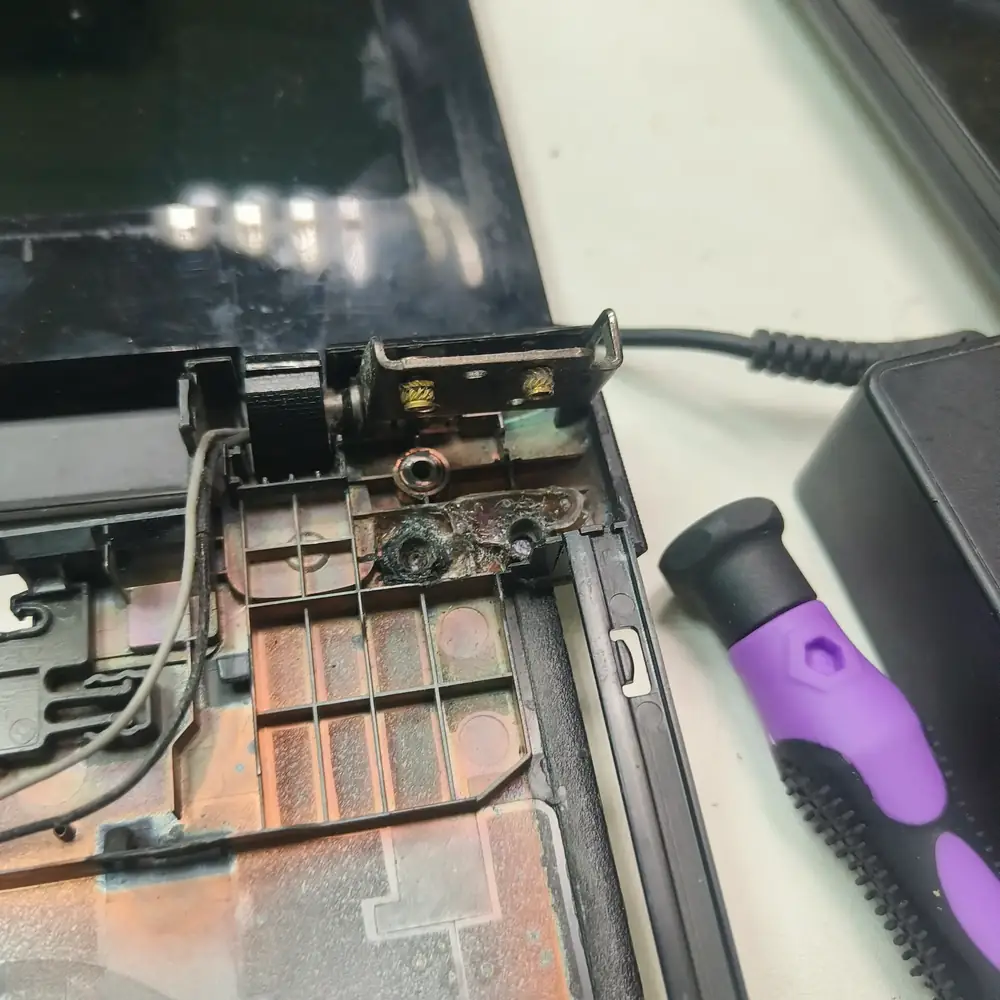
A hinge that has cracked the surrounding plastic chassis — common after heat cycles or a corner drop.
DO NOT force the laptop open or closed if you feel resistance. Forcing a stiff hinge will snap the internal display cable and crack the actual LCD screen, doubling the repair cost.
Inside the lab
When the external power path checks out but the laptop remains dead, the useful question is where power stops progressing through the board—not which expensive part to replace first.
We open the laptop and check the hinge brackets, the screws and the plastic mounting points.
We replace worn hinges and repair or replace the cover or mounting where it is cracked, with parts matched to your model.
We check that the cable running through the hinge has not been stretched or damaged.
We open and close the lid repeatedly and check that the display is stable, and the repair carries a 30-day warranty.
The KCROC approach
We loosen the hinge mechanism to factory tension, repair the broken plastic chassis using industrial resin or structural replacement, and realign the screen assembly.
Repair services
Questions customers ask
Yes. The display cable passes through the hinge area, and a hinge that moves unevenly can stretch it or crack the panel. Early repair usually costs less.
Then the hinge alone will not hold. The cover or mounting needs repairing or replacing, depending on the model. We confirm what is needed after inspecting it.
The exact model number, usually on the underside, helps us check parts first. The final quote is confirmed after inspection and before any paid work.
It is better not to, because every open and close adds stress. If you must use it, open the lid gently with both hands and avoid carrying it by the screen.