
Battery
Rapid drain, sharply reduced runtime, unexpected shutdowns, or a health report showing substantial wear can point toward battery degradation.
Battery replacementLearn 15+ warning signs of a failing laptop battery, check battery health on Windows 11 or MacBook, and tell the difference between battery wear, software drain, charger faults, and charging-circuit problems.
Safety first
If the battery or laptop case is bulging, the trackpad is lifting, or the battery area is unusually hot, stop using the laptop and arrange professional inspection.
Read the safety instructionsWatch for a pattern rather than one isolated symptom. Several warning signs together are a much stronger signal that the battery needs attention.
Battery drains far faster than it used to
Runtime has dropped dramatically from what it used to be
Laptop shuts down unexpectedly while charge remains
Battery won't charge, or charging stops early
Battery percentage jumps, freezes, or behaves erratically
Battery or laptop case is swollen, raised, or deformed
Trackpad or keyboard is being pushed upward
Unusual heat is concentrated around the battery area
Battery health/wear report shows substantial capacity loss
Windows or macOS shows a battery health/service warning
Laptop works normally on AC but becomes unstable on battery
Laptop only works when the charger is connected
Battery drains unusually while sleeping or closed
Charging pauses or behaves differently because of a charge-limit feature
Battery condition has worsened noticeably over time
Most important exception: swelling or deformation is a safety issue, not just a battery-health issue. Stop using the laptop and see the safety section.
A laptop that drains quickly may have a worn battery, but charging symptoms can come from the charger, charging port, charging circuit, or motherboard. Use the symptom that best matches what you see before buying a replacement battery.
Rapid drain, sharply reduced runtime, unexpected shutdowns, or a health report showing substantial wear can point toward battery degradation.
Battery replacementNo charging, intermittent charging, a loose connector, or a charger that works on another device can point toward the external power path.
Not charging troubleshootingIf the correct charger and charging input are good but the laptop still will not charge or power correctly, board-level diagnosis may be needed.
Charging-port repairScan the cards below. Each one tells you what you may notice, why it happens, and what the sensible next step is.
The battery percentage falls much faster than it used to, even during light, everyday use — not just during demanding tasks.
This is distinct from a sudden drop — it’s a gradual decline in how long the laptop lasts on a full charge compared to when it was new.
The laptop powers off suddenly, sometimes while still showing a non-zero battery percentage.
Charging stalls, stops early, or never starts — but the battery isn’t automatically the cause.
The reported charge level doesn’t match reality — a software or calibration symptom as often as a hardware one.
The clearest, most urgent warning sign — the battery or the case around it visibly bulges or deforms.
Not the same as a hot CPU or GPU — this is heat specifically from the battery area, distinct from normal thermal load.
Windows and macOS both expose an actual capacity figure — the most objective sign available, and the one to check first.
Windows and macOS will sometimes surface an explicit battery warning rather than making you go looking for one.
The laptop runs fine plugged in, but freezes, restarts, or throttles heavily as soon as it’s unplugged.
The actual physical condition and remaining capacity of the battery cell itself — what a Windows or macOS health report measures.
How long the laptop actually lasts on one charge right now — affected by workload, brightness, and background activity as much as by the battery.
A laptop can have good battery health but poor runtime because of a heavy workload; it can also have degraded health but feel fine under light, casual use. Checking the health report (below) before assuming the battery is bad prevents misdiagnosing a software problem as a hardware one.
powercfg /batteryreport.Cycle-count reporting varies by device and isn’t always included. As a rough frame: capacity close to design is healthy, a noticeable gap is worth monitoring, and a large, consistent gap combined with real-world symptoms is worth acting on — there’s no single threshold every manufacturer agrees on.
Exact wording and available detail can differ between macOS versions and Mac models. A "Service Recommended" or "Replace Soon" status is Apple’s own signal that capacity has dropped enough to matter — treat it as reliable.
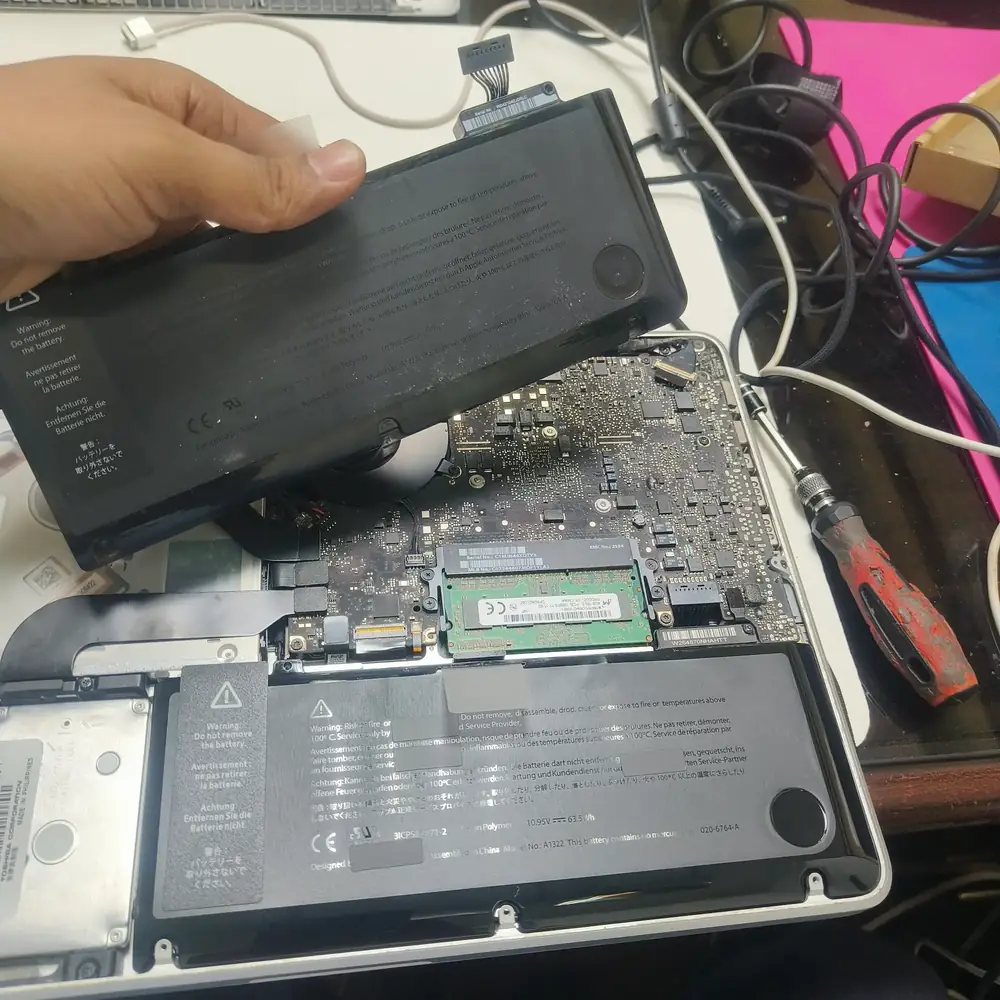
Contact KCROC at +96555301913 for safe battery removal and replacement. A swollen battery can be dangerous and should always be handled by professionals.
Diagnostic tool: Dell SupportAssist / BIOS diagnostics
Signs: BIOS battery warnings and error codes (601–607 range) at boot.
Replacement: Genuine or high-quality compatible, matched exactly by voltage (commonly 11.1V or 14.8V) and part number.
Safety: Reputable compatible batteries are safe when specs match exactly — verify before buying.
Diagnostic tool: HP Support Assistant → Battery Check
Signs: "Replace Battery" status, or system performance throttling tied to battery state.
Replacement: HP batteries carry specific part numbers — match the exact model, not just the laptop line.
Safety: Third-party HP-compatible batteries are safe if certified and spec-matched.
Diagnostic tool: Lenovo Vantage → Device → Battery
Signs: Health reported below roughly 80%, or a direct "consider replacing" message.
Replacement: Connector types differ across ThinkPad and IdeaPad lines — confirm exact model.
Safety: Compatible batteries are safe once connector type and voltage are verified.
Diagnostic tool: Acer Care Center
Signs: Wear-level reporting, plus rapid drain and charging issues in Aspire/Predator/Swift lines.
Replacement: Battery specs vary significantly by series — match the exact part number.
Safety: Quality compatible batteries are safe with correct voltage matching.
Diagnostic tool: MyASUS → Customer Support → Battery Health
Signs: Battery health percentage, plus performance throttling on ROG gaming models.
Replacement: Consumer and ROG gaming series use different batteries — verify the exact model.
Safety: Compatible batteries are safe if they meet original specs and carry proper certification.
Diagnostic tool: System Settings → Battery → Battery Health (full steps below)
Signs: "Service Recommended" or "Replace Soon" status; trackpad may raise if swollen.
Replacement: Requires professional installation on nearly all modern MacBooks; genuine Apple batteries recommended.
Safety: Third-party MacBook batteries carry more risk than most Windows equivalents — genuine strongly recommended.
Before assuming the battery itself is failing, rule out the software causes below — they’re far more common than genuine hardware wear.
Degradation becomes the more likely explanation once these are ruled out and the drain is consistent even under light, everyday use.
Overnight drain is usually explained by how the laptop handles standby, not by the battery itself. Behavior varies by hardware and by how Windows implements power management on that specific model, so treat the following as things to check rather than a universal fix.
Not every compatible battery is unsafe, and not every genuine battery is necessary — what matters is exact voltage, connector type, correct part/model number, and a reputable, certified manufacturer. Verify those four things regardless of which route you choose.
Is the battery swollen or physically deformed?
Does it shut down unexpectedly while on battery?
Has runtime dramatically decreased?
Does the health report show severe wear?
Could the drain be explained by heavy software/workload?
A proper diagnosis sometimes finds the real issue elsewhere. Common causes that get mistaken for a bad battery:
If the cause turns out to be a charging port, motherboard power circuit, or another hardware fault rather than the battery itself, our laptop repair service in Kuwait covers diagnosis and repair for those faults too — with the same free pickup and 30-day warranty.
Heat accelerates lithium-ion degradation faster than almost anything else — especially relevant in Kuwait's climate.
Many laptops now offer built-in charge-limiting or "optimized charging" — prefer these over manual habits.
Mismatched chargers can affect charging behavior and, over time, battery condition.
Regularly draining to 0% isn't a maintenance step — it adds stress with no health benefit for modern batteries.
Manufacturers periodically improve battery-management and power algorithms through updates.
If storing a laptop for a long period, a mid-range charge (roughly 40–60%) is gentler than 0% or 100%.
A note on "20–80% charging" and "calibration": keeping a battery away from prolonged extreme states can reduce stress, but it isn’t a strict rule every user needs to follow manually — use a manufacturer-supported charge limit where available instead. And letting a battery drain to 0% before recharging doesn’t restore lost capacity; it only recalibrates the OS’s percentage estimate, and only on devices where that’s actually recommended. Treat health and percentage accuracy as two different things.
High ambient temperatures put extra thermal stress on lithium-ion cells — particularly relevant locally, where laptops are often left in parked cars, used near direct sunlight, or run gaming workloads in poorly ventilated rooms. Heat is one of several factors that accelerate degradation, alongside cycle count and charging habits; Kuwait’s climate doesn’t on its own guarantee battery failure, but it does make good thermal habits worth taking seriously.
As a Kuwait-based repair shop, KCROC sees this pattern often enough that it’s worth calling out — avoiding car storage, direct sun, and dust buildup around vents goes a long way.
Battery behavior varies by model. These primary sources are the references used for the Windows, Mac, and swollen-battery safety guidance in this article.
Use these related KCROC paths when battery symptoms overlap with charging, power, or broader laptop faults.
Open the question that matches your problem. The detailed guidance above remains available if you want the full explanation.
Look at the pattern, not one symptom in isolation: fast drain, a battery health report showing severe wear, unexpected shutdowns, or swelling are the strongest indicators. A single odd reading is usually software, not a bad battery.
Open Command Prompt or Terminal and run "powercfg /batteryreport", then open the generated HTML file. It shows Design Capacity vs Full Charge Capacity, plus recent usage and capacity history. Full walkthrough above.
Go to System Settings → Battery → Battery Health. It shows a Maximum Capacity percentage and a Condition status such as Normal, Service Recommended, or Replace Soon.
There’s no single universal threshold across brands and models. As a general guide, health well below 80% combined with real-world symptoms (short runtime, shutdowns) is a reasonable point to consider replacement — treat it as one input, not a strict rule.
It varies with chemistry, charge cycles, heat exposure, and charging habits — commonly somewhere in the 2–4 year range for typical daily use, but a well-cared-for battery can last longer and a poorly treated one can degrade faster.
Cycle limits vary substantially by model, battery chemistry, and manufacturer. Apple, for example, publishes a model-specific maximum cycle count rather than one universal laptop number. A cycle represents cumulative battery usage equivalent to 100% of capacity, not necessarily one charging session.
It isn't always the battery. Background apps, brightness, connected peripherals, and pending updates are common software causes — see the fast-drain section above before assuming the battery is bad.
This usually means the battery can no longer maintain voltage under load, so the reported percentage becomes unreliable near that threshold — a fairly reliable sign of real wear.
Could be the charger, the cable, the port, the internal charging circuit, or the battery itself. Test with a known-good charger first; if that doesn’t help, it needs a proper diagnosis rather than a battery swap on a guess.
No. Stop using it immediately, keep it away from heat, and arrange professional removal. A swollen lithium-ion cell can pose a fire risk — see the safety section above for what to do and what to avoid.
Keeping it at 100% constantly adds some stress over time. If your laptop offers a charge-limit or optimized-charging feature, use it; otherwise, avoiding long stretches at exactly 100% or 0% is a reasonable habit.
Yes. Modern laptops route power directly to components when plugged in, largely bypassing the battery, so this doesn’t meaningfully add wear.
A high-quality compatible battery from a reputable manufacturer, matched exactly to voltage, connector, and certification, is generally safe. Not every third-party battery meets that bar, so sourcing matters more than the genuine-vs-compatible label alone.
For most laptops in Kuwait, 1–2 hours if the correct battery is in stock. Some MacBook models take 1–2 days due to adhesive removal and calibration.
Not sure whether the battery is actually failing? We diagnose before we replace — genuine or high-grade compatible batteries with professional installation.