1
Check whether other devices connect
If your phone connects to the same network but the laptop does not, the router is fine. Also try a phone hotspot. If the laptop fails on every network, the fault is in the laptop.
The WiFi icon disappears from Windows, the laptop cannot find any networks despite phones connecting fine, or the connection drops repeatedly during gaming or streaming.
Wi-Fi faults fall into four groups: settings and drivers, a loose or failed wireless card, a disconnected antenna cable, and, rarely, a fault on the motherboard. Finding out which group you are in matters, because resetting Windows will not repair a card that is physically failing, and replacing the card will not help if the real cause is a driver or a loose cable.
Start here
People often use the same phrase for a dead laptop, a black screen and a Windows boot failure. Choosing the correct path prevents unnecessary parts replacement.
Wi-Fi icon missing and no wireless adapter in Device Manager
The card is not being detected. It may be loose, failed or have a slot problem, and needs bench inspection.
Adapter listed with a warning icon
Usually a driver problem. Reinstalling the driver often fixes it; if not, the card may be failing.
Connects only very close to the router
An antenna cable has probably come loose or been damaged. It is a small repair but needs the laptop opened.
Drops out repeatedly during games or video calls
Test the card and its power-saving settings. A budget card that has degraded is replaced with a better one.
Safe troubleshooting
If your phone connects to the same network but the laptop does not, the router is fine. Also try a phone hotspot. If the laptop fails on every network, the fault is in the laptop.
Make sure Airplane mode is off, try the Wi-Fi key on the keyboard (often combined with an Fn key) and restart the laptop. A hardware switch or key can turn the adapter off.
Open Device Manager and expand Network adapters. If a wireless adapter is listed, the card is detected and the problem may be a driver. If no wireless adapter appears at all, the laptop is not detecting the card.
If the adapter shows a warning icon, uninstall it and install the latest driver from the laptop manufacturer's support page. Use a cable or another device to download it if needed.
A laptop that only connects when it is next to the router often has an antenna cable that has come loose inside. Drops during gaming or streaming can point to a failing card.
Root causes
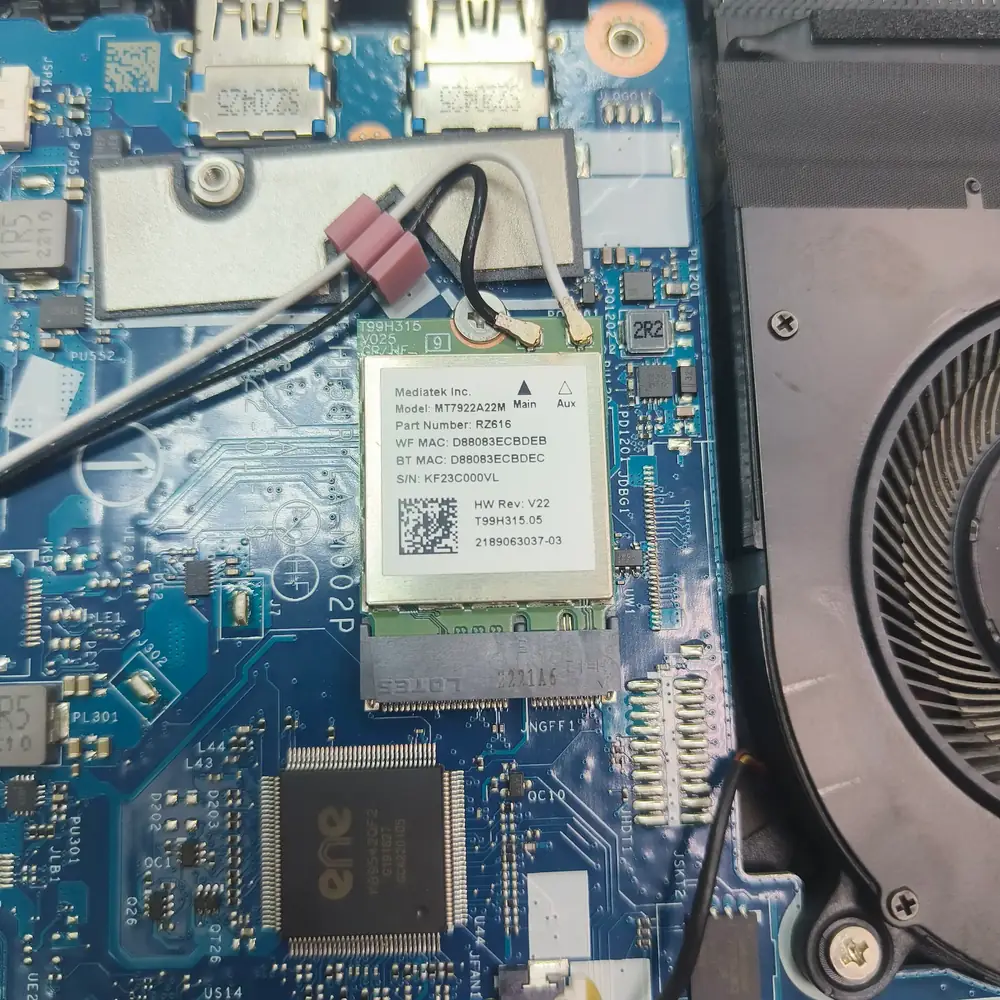
Checking the internal Wi-Fi card and antenna connections when the network icon disappears.
Do not attempt a "Network Reset" if the WiFi card is physically missing from the Device Manager — this will not fix a dead hardware component and wastes time.
Inside the lab
When the external power path checks out but the laptop remains dead, the useful question is where power stops progressing through the board—not which expensive part to replace first.
We open the laptop, check that the wireless card is seated properly and that both antenna leads are attached to the right connectors.
We test with a known-good card where needed, so we can tell a failed card apart from a faulty slot on the board.
If the card has failed, we fit a compatible Intel Wi-Fi 6 card for your model. If it was a loose cable or a driver, we fix that instead.
We check connection stability and speed over time before returning the laptop, and the repair is covered by our 30-day warranty.
The KCROC approach
We diagnose the M.2/PCIe WiFi card. Usually, upgrading a failed budget card to a high-quality Intel AX (Wi-Fi 6) card permanently resolves dropouts and significantly boosts speeds.
Repair services
Questions customers ask
Often yes. A driver reinstall or a reconnected antenna cable fixes many cases. We only replace the card when testing shows that it has failed.
It depends on the model and the type of slot it has. We check compatibility before replacing anything, and tell you which card we recommend.
The rest of the laptop is working and the fault is in the wireless path: the driver, the card or the antenna cables. A cable connection can keep you online while the repair is arranged.
Frequently. A card swap is one of the cheaper repairs, and a newer card can give a more stable connection. We tell you the price after diagnosis, and No Fix, No Fee applies.