KCROC — Kuwait Computer Repair On Call
Independent MSI repair in Kuwait

MSI Laptop Repair Kuwait

Independent MSI laptop repair in Kuwait from KCROC’s Hawalli lab for Katana, Raider, Stealth, Thin and Cyborg models. We diagnose hinge and chassis damage, charging and no-power faults, cooling problems, battery swelling and black screens. Board-level repair is considered only after model-specific testing, with a quote before paid work and free pickup and delivery across Kuwait.

KCROC is an independent repair provider, not an official MSI service centre. We offer an independent repair option for out-of-warranty devices and for customers who choose non-OEM repair. Check the manufacturer's warranty terms before proceeding if coverage may still apply.

Free diagnosis firstFree Kuwait-wide pickup & deliveryNo Fix, No Fee30-day warranty
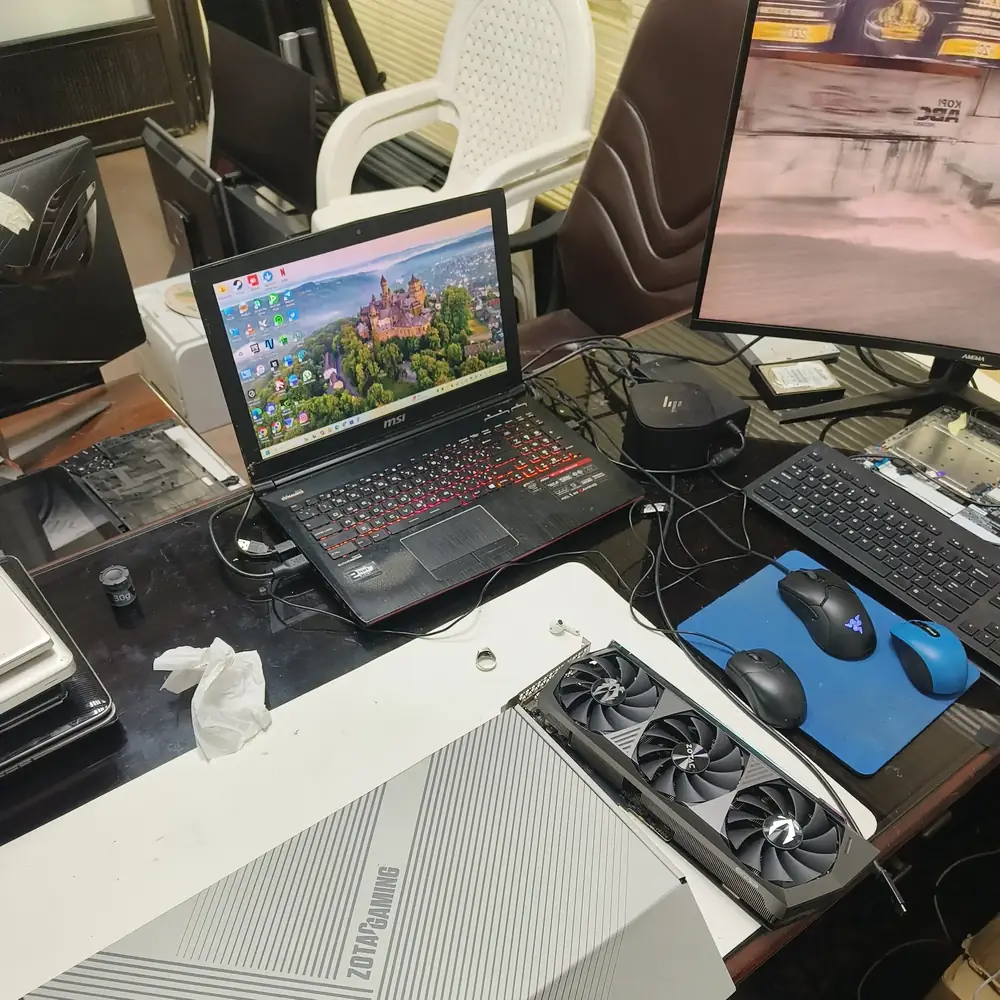
MSI Gaming Laptop Repair Workstation
MSI gaming laptop and graphics hardware on the KCROC repair workstation for model-specific diagnosis.

MSI portfolio

MSI laptop families we repair

Different MSI families use different chassis, thermal, charging and board designs. This page covers the major families without creating duplicate pages for every model.

Katana, Thin & Cyborg

MSI gaming laptop families where the exact chassis revision matters when diagnosing hinge mounts, charging, fan noise and power faults.

Katana GF66Thin GF63Cyborg 15

Repair focus

Hinge and chassis · Charging · Cooling · Power diagnosis

Raider & Stealth

Performance-focused MSI systems that can need careful GPU/CPU cooling, fan, display, charging or board-level diagnosis under gaming loads.

Raider GE76Stealth GS66

Repair focus

Thermals · GPU/power · Display · Motherboard

Repair coverage

MSI laptop problems we repair

We diagnose the symptom first, then follow the appropriate repair path. The links below point to KCROC's existing problem entities rather than creating thin, duplicate MSI problem pages.

high

Broken MSI hinge or lifted screen lid

A stiff hinge can pull brass threaded inserts or standoffs out of the plastic lid or base, separating the bezel or cracking the cover. We inspect the hinge, mounting bosses, lid, bezel and display cable. Where the chassis design and remaining material permit a durable repair, the mounts can be structurally reconstructed and hinge resistance corrected; otherwise, we quote for the appropriate hinge or cover replacement. Stop opening the lid if you hear cracking.

View diagnosis guide
high

MSI no-power fault or charging light but no boot

A charging LED with no boot, no response, or abnormal current draw can point to an input or board-level fault. Depending on the exact MSI board, diagnosis may include the DC input path, 19V main rail where present, fuse, high-side MOSFETs, shorted ceramic capacitors and charging IC. We isolate the failed circuit before recommending a component repair or replacement; not every board has the same design or is repairable.

View diagnosis guide
high

MSI overheating, FPS drops or loud fans

Dust-packed heatsink fins, restricted airflow, a worn fan or a degraded thermal interface can cause temperatures to rise, fan noise to increase and CPU/GPU clocks to fall during gaming. We inspect fan operation and the fin stack, remove accumulated dust, check temperatures under an appropriate load and select thermal-interface materials for the specific cooler. VRAM and VRM areas need the correct pad thickness or suitable putty, not a one-size-fits-all application.

high

Loose charging port or intermittent power

Charging that cuts in and out when the connector moves can be caused by a damaged barrel DC jack, USB-C Power Delivery port, solder joints or the charging circuit. Connector type and circuit design vary by MSI model, so we verify the exact device and board before micro-soldering or replacing a port.

high

Power light on but MSI screen stays black

Fans or keyboard lights may turn on while the screen remains black because of a display, memory, firmware, power-sequencing or motherboard fault. We check the external-display response, panel and cable connections, startup behaviour and board signals before choosing the repair path.

high

MSI battery swelling or rapid drain

A raised trackpad, separating palm rest or bulging bottom cover can indicate a swollen lithium battery. Stop charging and using a visibly swollen device, do not press or puncture the battery, and arrange safe handling and model-compatible replacement.

View diagnosis guide

Diagnosis before replacement

A MSI motherboard fault does not automatically mean a new motherboard

A no-power, charging or intermittent fault can originate in a particular circuit or component. KCROC tests the hardware first and recommends the repair path supported by the diagnosis. Where technically practical, that can mean repairing the failed component rather than replacing the entire board.

A complete motherboard replacement can still be the right answer when the board is not economically or technically repairable. The important step is diagnosing the actual fault before deciding.

Hinge and chassis reconstruction: inspect brass threaded inserts/standoffs, cracked mounting bosses and hinge resistance; rebuild only where the chassis condition supports a durable repair.
Board-level no-power diagnosis: model-specific checks of the input path, 19V main rail where applicable, fuses, high-side MOSFETs, shorted ceramic capacitors and charging ICs.
USB-C Power Delivery or barrel DC-jack diagnosis and micro-soldering, depending on the exact MSI model and connector design.
Embedded-controller (EC) checks or firmware work only where supported by the exact board and justified by diagnostic findings.
Gaming thermal service: dust and fin-stack cleaning, fan checks, CPU/GPU thermal-interface assessment, and model-compatible VRAM/VRM pads or putty with suitable thickness.
Post-repair validation of relevant power, charging, display, cooling and stability functions.

Related KCROC services

MSI repair services

Laptop Repair Kuwait

Component-level laptop diagnostics, micro-soldering and hardware restoration — free pickup across Kuwait, a clear quote before paid work and a 30-day warranty.

Explore service

Gaming Laptop Repair Kuwait

Gaming laptop repair in Kuwait for overheating, FPS drops, black screens, power and charging faults.

Explore service

Gaming Laptop Cleaning & Thermal Repaste Kuwait

Professional internal cleaning, thermal-interface service and cooling-system testing for gaming laptops running hot, loud or slower than they used to.

Explore service

Motherboard Repair Kuwait

Laptop, desktop, and MacBook motherboard repair for power, charging, and component-level board faults where repair is suitable.

Explore service

Laptop Hinge & Chassis Repair Kuwait

Structural hinge, bezel, lid, and chassis repair for laptops before a stiff hinge turns into screen or cable damage.

Explore service

Laptop Charging Port Repair Kuwait

Laptop DC jack, rectangular Slim-Tip and USB-C charging-port repair in Kuwait, with connector replacement, micro-soldering and board-level power diagnostics.

Explore service

Laptop Battery Replacement Kuwait

Windows laptop battery testing and replacement in Kuwait. We check battery health and the charging path, then confirm exact model compatibility and part availability before quoting.

Explore service

Laptop Screen Repair Kuwait

Windows laptop screen repair and replacement in Kuwait. Cracked LCD, IPS, OLED and touch displays: we check the panel, cable and backlight first. Screen fitting labour from 30 KWD plus the compatible panel.

Explore service

Repair workflow

How KCROC handles a MSI repair

01

Identify the exact MSI model

We confirm the full model and board revision, then record whether the symptom is a broken hinge, no-power fault, charging issue, overheating, black screen or battery problem.

02

Trace the symptom to its cause

Depending on the fault, checks can include hinge resistance and mounting inserts, fan and heatsink airflow, charger and port behaviour, input rails and board-level components.

03

Explain the repair options

We distinguish repairable mounts or components from damage that needs a compatible replacement part. The price is confirmed before any paid work begins.

04

Perform the approved repair

Work may include chassis reconstruction, connector micro-soldering, component-level board repair, cooling service or replacement of a confirmed failed part.

05

Verify the reported fault

We check relevant functions after repair, such as hinge movement, charging, startup, display, fan operation, temperatures and system stability.

Real hardware context matters

KCROC's repair content is built around the actual hardware, symptoms and diagnostic path rather than generic brand descriptions.

View repair gallery

Questions

MSI repair FAQs

Can a broken MSI hinge be fixed without replacing the whole screen?

Often, yes, if the panel and cable are intact and the lid or base still supports a durable mount repair. We inspect the hinge, brass threaded inserts, plastic mounting bosses, bezel and display cable first. Structural reconstruction may be suitable in some cases; severely damaged plastic or a cracked panel may require the correct replacement part.

Can you repair an MSI motherboard that has a charging light but will not turn on?

We diagnose the input and power circuits first. Depending on the exact board, testing may cover the main input rail, MOSFETs, fuses, shorted capacitors and charging IC. Component-level repair is offered when the fault is isolated and the board is technically repairable; otherwise we explain the alternatives.

Do you use PTM7950 for MSI gaming laptop overheating?

PTM7950 is a phase-change thermal-interface option, not a universal fit for every MSI cooler. We check the exact model and heatsink design, then confirm the suitable material before work. VRAM and VRM contact points can require model-correct pad thickness or compatible putty; using the wrong material can reduce contact and cooling.

Can you repair an MSI USB-C or barrel charging port?

For supported models, we inspect the port, solder joints and charging circuit to determine whether connector replacement or a board-level repair is appropriate. USB-C Power Delivery and barrel-jack designs differ, so we confirm the full model before quoting.

How much does MSI laptop repair cost in Kuwait?

The MSI page lists a starting rate from 20 KWD, not a guaranteed price for every fault. The cost depends on model, diagnosis, parts and repair scope; motherboard work or imported parts may cost more. Diagnosis is free and KCROC confirms the quote before paid work.

Where is your MSI laptop repair center in Kuwait?

KCROC is an independent repair lab at Al Mullah Complex, Basement Shop 19, Ibn Khaldoun Street, Hawalli. We are not an MSI-authorized service center. Free pickup and delivery are available across Kuwait, including Hawalli, Capital, Farwaniya, Ahmadi, Jahra and Mubarak Al-Kabeer.

هل تصلحون لابتوبات MSI في الكويت؟

نعم، نقدم خدمة تصليح لابتوب MSI في الكويت، بما فيها فحص أعطال المفصلات والشحن والطاقة والحرارة حسب الموديل. تتوفر خدمة الاستلام والتوصيل مجاناً من حولي إلى مختلف مناطق الكويت. للحجز تواصل معنا عبر واتساب على +965 55301913.

MSI laptop repair across Kuwait

Brand-specific repair is available through KCROC pickup and delivery. Use the local page that matches your area, then send the model and symptoms to a technician.

KCROC provides pickup and delivery service across Kuwait. If your MSI has a power, charging, screen, hinge, thermal, battery or motherboard problem, start with the symptom and model; the repair path can then be determined from the diagnosis.

Core repair services

Start with the main Kuwait repair service

For MSI faults, use the focused laptop repair hub for the main repair path or the broader computer repair hub for desktop and other PC needs.

Need MSI laptop repair in Kuwait?

Tell us the MSI model and what it is doing. KCROC can diagnose the fault first, explain the repair path and quote before repair work begins.